A calculator converter reduces friction converting DMS coordinates into decimal degrees with precision and speed.
Engineers, surveyors, GIS analysts require effortless tools for accuracy, traceability, and reproducibility across workflows globally.
DMS to Decimal Degrees — Precision Converter for Surveying & GIS
Why a Dedicated DMS to Decimal Converter Is Essential for Professionals
Degrees-minutes-seconds (DMS) and decimal degrees (DD) are both ubiquitous in spatial data management. Converting accurately between formats is fundamental for:
- Interoperability among GIS platforms (ArcGIS, QGIS), surveying instruments, and web mapping APIs.
- Compliance with coordinate reference systems such as WGS84 (EPSG:4326) or local projections.
- Maintaining numeric precision for geodetic computations, cadastral surveys, and asset positioning.
Errors during manual conversion propagate into models, which can lead to legal, safety, and cost implications in engineering projects.
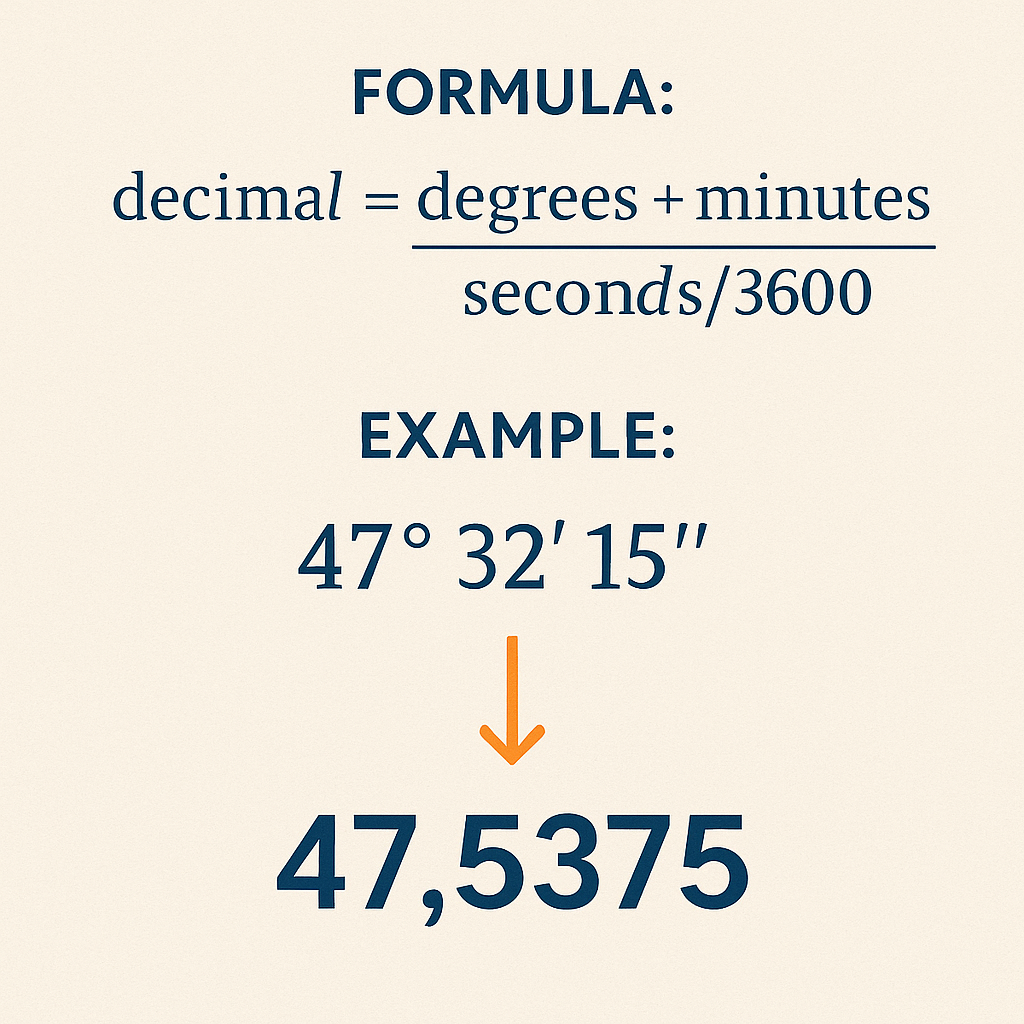
Core Conversion Formula and Sign Convention
At the technical core, the conversion formula is compact but requires strict handling of signs, hemisphere notation, and rounding rules.
Primary conversion formula
When coordinates are in the southern hemisphere or western longitude, apply a negative sign:
Decimal degreessigned = sign × (degrees + minutes / 60 + seconds / 3600)
Variable definitions and typical value ranges
- degrees (D): integer part of angular measurement. Typical ranges: latitude 0–90, longitude 0–180.
- minutes (M): 0–59. Non-integer values are possible after intermediate computations but raw DMS uses integer minutes.
- seconds (S): 0–59.999... Typically reported to two decimal places in surveys (centi-seconds).
- sign: +1 for N/E, −1 for S/W. Some datasets use 'N','S','E','W' indicators instead of sign.
Precision, Rounding Rules, and Numeric Representation
Choosing precision impacts downstream calculations. Decimal degrees used at different resolutions:
- 1 decimal degree ≈ 111 km
- 2 decimals ≈ 11.1 km
- 4 decimals ≈ 11.1 m
- 6 decimals ≈ 0.0111 m (≈ 1 cm)
For engineering and cadastral tasks, at least five to seven decimal places are recommended depending on project requirements. Always store intermediate results in double precision (IEEE 754 64-bit) to avoid accumulation of rounding error.
Handling Edge Cases and Input Validation
Robust converters must validate input and normalize edge values:
- Reject minutes or seconds outside [0,60). If input seconds equal exactly 60, increment minutes by 1 and set seconds to 0.
- If minutes become 60 due to carry, increment degrees accordingly.
- Accept negative degrees only if minutes and seconds are non-negative; interpret sign applied to the whole DMS triple.
- Normalize degrees > 180 for longitude or > 90 for latitude by mapping or rejecting based on context.
Reference Conversion Tables for Common DMS Values
Quick lookup tables accelerate manual verification and UX flows. The following tables show common conversions with high precision.
| DMS (Latitude) | Decimal Degrees | Notes |
|---|---|---|
| 0° 0′ 0″ N | 0.000000 | Equator |
| 15° 30′ 0″ N | 15.500000 | Simple half-degree |
| 23° 26′ 22″ N | 23.439444 | Approx. Earth's axial tilt |
| 34° 3′ 8.4″ S | -34.052333 | Example with fractional seconds |
| 45° 0′ 30″ N | 45.008333 | Small seconds fraction |
| 51° 28′ 40″ N | 51.477778 | Greenwich Observatory |
| 60° 0′ 0″ S | -60.000000 | High southern latitude |
| 89° 59′ 59.99″ N | 89.999997 | Near north pole |
| DMS (Longitude) | Decimal Degrees | Notes |
|---|---|---|
| 0° 0′ 0″ E | 0.000000 | Prime meridian |
| 77° 36′ 55.5″ W | -77.615417 | Washington DC approximate |
| 122° 25′ 9″ W | -122.419167 | San Francisco approx. |
| 2° 20′ 14″ E | 2.337222 | Paris approximate |
| 139° 41′ 30″ E | 139.691667 | Tokyo approx. |
| 180° 0′ 0″ W | -180.000000 | International Date Line (west) |
| 179° 59′ 59.99″ E | 179.999997 | Near International Date Line (east) |
Practical Algorithms for Batch Conversion
In professional environments you often convert thousands of DMS entries. Implementations should prioritize vectorized or streamed processing for memory efficiency.
Algorithmic steps for batch processing
- Parse raw input into structured fields: sign indicator (or signed degrees), degrees integer, minutes integer, seconds float.
- Validate fields: minutes, seconds ranges; degrees within latitude/longitude limits depending on type.
- Apply conversion formula in floating-point double precision: dd = sign × (D + M / 60 + S / 3600).
- Optionally round to project-specific precision (e.g., 6 decimals for asset mapping).
- Write results to geospatial data structure (GeoJSON coordinates order: [longitude, latitude]) or database with CRS metadata.
Pseudo-implementation considerations
- Use 64-bit floats (double) during computation. Cast to decimal type only for display when necessary.
- Preserve original DMS strings for audit trails.
- Record applied normalization steps in logs when carries occur (e.g., seconds = 60 adjustment).
Real-World Example 1: Single-Point Conversion with Southern Hemisphere and Seconds Fraction
Problem statement: Convert the following DMS coordinate to signed decimal degrees for ingest into a GIS:
- Latitude: 34° 3′ 8.4″ S
- Longitude: 18° 25′ 26.4″ E
Step-by-step calculation (Latitude)
1) Identify variables:
- D = 34
- M = 3
- S = 8.4
- sign = −1 (because S)
2) Apply the formula:
Rounded to six decimals for GIS: −34.052333
Step-by-step calculation (Longitude)
1) Identify variables:
- D = 18
- M = 25
- S = 26.4
- sign = +1 (because E)
2) Compute:
Rounded to six decimals: 18.424000
Result and GIS ingestion
Final coordinate pair in decimal degrees (longitude, latitude) as used in GeoJSON:
[18.424000, -34.052333]
Notes: Preserve double precision internally; round only for display or storage if specified by data schema.
Real-World Example 2: Batch Entry with Normalization and Carry Handling
Problem statement: Convert a DMS entry where seconds equal 60 and minutes equal 59; ensure normalization is correct.
- Latitude: 12° 59′ 60″ N (this is equivalent to 13° 0′ 0″ N)
- Longitude: 179° 59′ 60″ W (equivalent to 180° 0′ 0″ W but careful with sign)
Normalization steps for latitude
- Initial: D = 12, M = 59, S = 60, sign = +1 (N)
- Since S == 60, set S = 0 and increment M → M = 60.
- Since M == 60, set M = 0 and increment D → D = 13.
- Final normalized DMS: 13° 0′ 0″ N.
- Decimal degrees = 13 + 0/60 + 0/3600 = 13.000000
Normalization steps for longitude
- Initial: D = 179, M = 59, S = 60, sign = −1 (W)
- S == 60 → S = 0; M = 60
- M == 60 → M = 0; D = 180
- Final normalized DMS: 180° 0′ 0″ W
- Decimal degrees raw = 180 + 0/60 + 0/3600 = 180.000000
- Apply sign for west: Longitude = −180.000000
- Note: −180 and +180 represent the same meridian in longitudes; choose sign convention consistent with dataset.
Resulting coordinate
Decimal pair: [−180.000000, 13.000000]
Implementation note: When a dataset forbids −180, normalize to +180 or wrap to allowed range based on projection guidelines.
Interoperability with Coordinate Reference Systems and Standards
Conversion does not change datum. Ensure the datum (e.g., WGS84) is explicit during data exchange to avoid shifts.
- WGS84 (EPSG:4326) is the de facto standard for web mapping and GPS outputs.
- Local datums (e.g., NAD83, ETRS89) require datum transformation when moving between systems; conversion DMS→DD is orthogonal to datum transformations but must be combined correctly.
Normative references and authoritative resources
- EPSG Geodetic Parameter Dataset — https://epsg.org/
- NOAA National Geodetic Survey (coordinate conversion tools) — https://www.ngs.noaa.gov/
- ISO 6709:2008 — Representation of geographic point location by coordinates (standard reference)
- OGP Geomatics Guidance — https://www.iogp.org/ (International Association of Oil & Gas Producers)
- USGS and GNSS technical resources — https://www.usgs.gov/
Testing, Validation, and QA Practices
Establish unit tests, cross-check with authoritative tables, and verify against GNSS receivers and high-precision benchmarks.
- Create test vectors including poles, equator, meridians, and random samples across global extents.
- Use round-trip tests: DMS → Decimal → DMS and ensure original and round-tripped values match within tolerance.
- Log normalization events and invalid inputs for auditing.
UX and API Design Recommendations for a Converter Tool
Design a converter that reduces human error and supports programmatic integration:
- Accept multiple input formats: "34 3 8.4 S", "34°03'08.4\" S", signed numeric degrees.
- Auto-detect hemisphere letters; allow explicit sign override.
- Provide immediate validation feedback and show normalized DMS if carries occur.
- Allow configuration of output precision (e.g., 6 decimals for mapping, 9+ for high-precision engineering).
- Offer batch upload (CSV, GeoJSON) with mapping of input fields and downloadable results.
Security, Performance, and Data Integrity Considerations
Large batch conversions must consider resource consumption and data confidentiality.
- Stream processing to reduce memory footprint on very large datasets.
- Rate limit API endpoints and provide async processing for heavy workloads.
- Encrypt data in transit (TLS) and at rest when storing sensitive project coordinates.
- Include checksums or versioning for result files to support reproducibility audits.
Advanced Topics: Handling Non-Integer Minutes and Seconds and High-Precision Outputs
Some instruments output minutes as floating-point values. Normal conversion still applies but ensure parsing handles decimals properly.
Example: 12° 30.5′ 0″ is equivalent to 12° 30′ 30″ because 0.5 minutes = 30 seconds.
| Minutes or Seconds Input | Equivalent Decimal Degrees Addition | Practical Use |
|---|---|---|
| 0′ | 0.000000 | No addition |
| 15′ | 0.250000 | Quarter degree |
| 30′ | 0.500000 | Half degree |
| 45′ | 0.750000 | Three quarters |
| 30″ | 0.008333 | Small fraction, used in precise positioning |
| 0.1′ (6″) | 0.001667 | Precision reporting common in surveying |
| 0.01″ | 2.7778e-06 | High-precision GNSS residuals |
Integration Examples with Common Tools and Formats
Standardize outputs so they integrate cleanly with GIS and web mapping:
- GeoJSON uses decimal degrees order [longitude, latitude].
- WKT POINT uses decimal degrees and must include CRS metadata if not EPSG:4326.
- CSV exports should include column headers: id, lat_dms, lon_dms, lat_dd, lon_dd, datum, precision.
Performance Benchmarks and Optimization Tips
When converting millions of points, micro-optimizations pay off.
- Vectorize computations in languages that support it (NumPy in Python, native arrays in C#/.NET).
- Avoid repeated string parsing by pre-tokenizing input into numeric arrays.
- Use concurrency (thread pools, async I/O) for parsing and I/O-bound tasks; keep arithmetic single-threaded or use thread-safe libraries.
Auditability and Metadata Best Practices
Maintain provenance information to support regulatory and contractual requirements.
- Store original DMS input string.
- Record datum, conversion timestamp, software version, and user ID.
- Include a conversion checksum or UUID to link result back to source inputs.
Further Reading and Authoritative References
Consult these references for standards, definitions, and tools used in geodesy and coordinate handling:
- European Petroleum Survey Group (EPSG) registry — https://epsg.org/
- NOAA National Geodetic Survey — https://www.ngs.noaa.gov/
- ISO 6709 standard summary — https://www.iso.org/standard/35813.html
- OGP Geomatics recommendations — https://www.iogp.org/
- USGS GNSS guidance — https://www.usgs.gov/core-science-systems/national-geospatial-program
Actionable Checklist for Implementing a Reliable DMS→Decimal Converter
- Design input parser to accept multiple DMS notations and hemisphere markers.
- Implement strict validation rules for minutes and seconds, with normalization logic.
- Use double precision arithmetic and configure output rounding per project specification.
- Log normalization and error events; preserve original input for audits.
- Test extensively against authoritative datasets and perform round-trip validation.
- Expose batch and API interfaces with secure transport and async processing options.
Practical Checklist for Field Engineers and Surveyors
Field users should follow these guidelines to minimize data-quality issues:
- Record hemisphere explicitly when collecting DMS values.
- Use standardized notation with spacing and separators to facilitate parsing.
- Cross-check converted decimal degrees against instrument readings and known control points.
- Stamp files with datum and timestamp before sharing.
Final Remarks on Operationalizing Conversion Tools
Implementing a robust DMS to decimal converter is straightforward in algorithmic terms but requires careful attention to validation, precision, and interoperability. When combined with adherence to standards and well-defined QA practices, such a converter becomes a reliable component in any geospatial workflow.