This technical guide details essential features of an inches-to-fractions conversion calculator for precision woodworking tasks.
Read on for algorithms, accuracy trade-offs, implementation patterns, and best practice recommendations for calculators worldwide.Inches to Fractions Precision Converter — Engineering Tool
Why an inches-to-fractions calculator is essential for professionals
Accurate inch-to-fraction conversion is a core requirement across engineering, machining, carpentry, and manufacturing workflows. Small errors in fractional rounding generate assembly failures, fitment problems, or costly rework, so a reliable calculator must provide precise, configurable rounding and reproducible results.A best-practice calculator must support multiple denominators, configurable rounding modes, and robust numeric handling to avoid floating-point artifacts. This section overviews use cases and the domain-specific precision expectations that drive design choices.Primary use cases and user requirements
- Carpentry and joinery: fast conversion to 1/16 or 1/32 inch resolution with human-friendly output (e.g., 3 11/16").
- Machining and fabrication: require exact fractional approximations to specified tolerances and traceability for process control.
- CAD/CAM interoperability: conversion must be lossless whenever possible or use configurable quantization for shared files.
- Quality control and inspection: convert measurement probe outputs (decimals) to fractional representations for legacy documentation.
- Education and training: explain fractional math, rounding rules, and best denominator choices.
Mathematical foundations: exact conversion and rounding
To convert a decimal-inch value to a fractional-inch representation you separate integer and fractional parts, multiply the fractional part by the chosen denominator, round to the nearest integer numerator, then reduce the fraction.Core formulas (HTML only):
Let D = measured value in inches (decimal).
I = floor(D) (integer inches).
F = D - I (fractional part, 0 ≤ F < 1).
denom = chosen denominator (common values: 2, 4, 8, 16, 32, 64).
raw_numer = F * denom.
numer = round(raw_numer).
If numer == denom then I = I + 1 and numer = 0.
Reduce fraction: gcd = GCD(numer, denom); numer_reduced = numer / gcd; denom_reduced = denom / gcd.
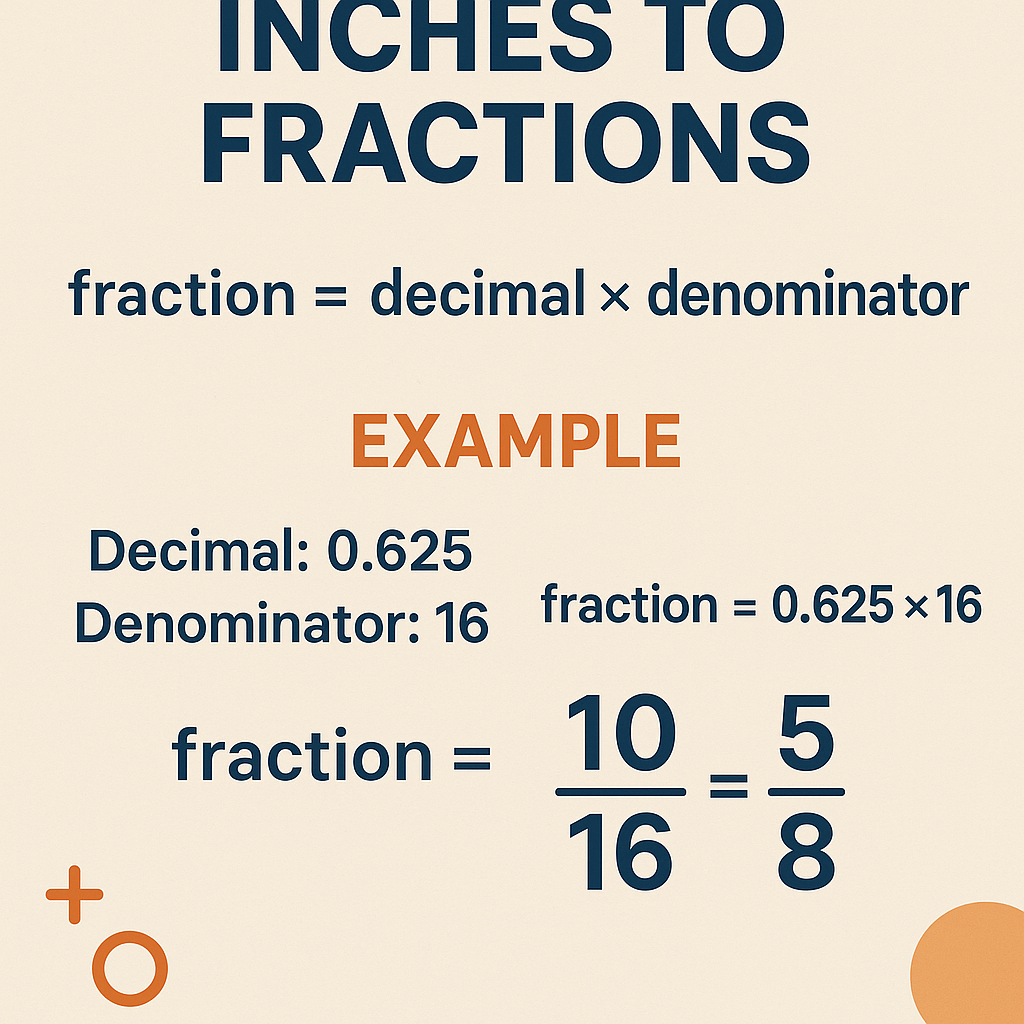
Where round(x) uses the configured rounding mode (nearest, floor, ceiling, bankers).
Variable explanations and typical values
- D — decimal inches measurement. Typical range depends on application; for furniture, 0.0–96.0 inches; for small parts, 0.0–6.0 inches with high precision.
- I — integer inches after floor(D). Example: for D = 3.6875, I = 3.
- F — fractional part between 0 and 1. Example: for D = 3.6875, F = 0.6875.
- denom — denominator selected by user: typical set {2, 4, 8, 16, 32, 64}.
- raw_numer — unrounded numerator value. Example: for F = 0.6875 and denom = 16, raw_numer = 0.6875 * 16 = 11.
- numer — rounded numerator (integer). Example: 11 for the previous case.
- gcd — greatest common divisor to reduce fraction. Example: gcd(8,16) = 8.
Precision handling and floating-point pitfalls
Floating-point binary representation can make decimal fractions like 0.1 or 0.3333333333 non-exact, which can lead to incorrect rounding when multiplied by large denominators. A robust calculator should use integer arithmetic where possible: scale the original decimal to an integer numerator using fixed-point arithmetic, or use a decimal type (e.g., BigDecimal) to avoid binary rounding.Technical recommendations:- Prefer integer math: If inputs are given with N decimal digits, multiply by 10^N and operate on integers.
- Use arbitrary-precision decimal types (BigDecimal, Decimal128) when available to preserve exact decimal fractions.
- Provide configurable rounding modes: round-to-nearest (ties-to-even), round-up, round-down. Document which mode is default.
- When supporting denominators up to 64, compute numer = round(F * denom + ε) where ε is a tiny bias to correct known binary rounding, or use exact decimal arithmetic to avoid needing ε.
Algorithmic workflow (industry-grade)
- Parse input value and user-selected denominator.
- Normalize input to decimal representation with controlled precision.
- Compute integer and fractional parts using exact decimal methods.
- Compute raw numerator = fractional * denom.
- Apply user-specified rounding mode to raw numerator.
- Handle carry if numerator == denom by incrementing integer part.
- Reduce the resulting fraction by GCD for user-friendly output.
- Render output in common formats: numeric (3.6875), mixed fraction (3 11/16"), vulgar fraction (11/16"), and metric equivalent (mm).
- Provide undo/redo and copy-to-clipboard, along with accessible labels for screen readers.
Tables: common fractional-inch values and equivalents
The following table shows fractions at 1/64-inch resolution, their simplified fractional forms when possible, decimal inch equivalents (6-digit precision), and metric equivalents (millimeters, 3-digit precision). This table is essential as a reference for calculators and documentation.
| 64ths | Simplified Fraction | Decimal Inches | Millimeters (mm) |
|---|---|---|---|
| 0/64 | 0 | 0.000000 | 0.000 |
| 1/64 | 1/64 | 0.015625 | 0.397 |
| 2/64 | 1/32 | 0.031250 | 0.794 |
| 3/64 | 3/64 | 0.046875 | 1.191 |
| 4/64 | 1/16 | 0.062500 | 1.588 |
| 5/64 | 5/64 | 0.078125 | 1.984 |
| 6/64 | 3/32 | 0.093750 | 2.381 |
| 7/64 | 7/64 | 0.109375 | 2.778 |
| 8/64 | 1/8 | 0.125000 | 3.175 |
| 9/64 | 9/64 | 0.140625 | 3.572 |
| 10/64 | 5/32 | 0.156250 | 3.969 |
| 11/64 | 11/64 | 0.171875 | 4.366 |
| 12/64 | 3/16 | 0.187500 | 4.763 |
| 13/64 | 13/64 | 0.203125 | 5.159 |
| 14/64 | 7/32 | 0.218750 | 5.556 |
| 15/64 | 15/64 | 0.234375 | 5.953 |
| 16/64 | 1/4 | 0.250000 | 6.350 |
| 17/64 | 17/64 | 0.265625 | 6.747 |
| 18/64 | 9/32 | 0.281250 | 7.144 |
| 19/64 | 19/64 | 0.296875 | 7.540 |
| 20/64 | 5/16 | 0.312500 | 7.937 |
| 21/64 | 21/64 | 0.328125 | 8.334 |
| 22/64 | 11/32 | 0.343750 | 8.731 |
| 23/64 | 23/64 | 0.359375 | 9.128 |
| 24/64 | 3/8 | 0.375000 | 9.525 |
| 25/64 | 25/64 | 0.390625 | 9.921 |
| 26/64 | 13/32 | 0.406250 | 10.318 |
| 27/64 | 27/64 | 0.421875 | 10.715 |
| 28/64 | 7/16 | 0.437500 | 11.112 |
| 29/64 | 29/64 | 0.453125 | 11.509 |
| 30/64 | 15/32 | 0.468750 | 11.906 |
| 31/64 | 31/64 | 0.484375 | 12.302 |
| 32/64 | 1/2 | 0.500000 | 12.700 |
| 33/64 | 33/64 | 0.515625 | 13.097 |
| 34/64 | 17/32 | 0.531250 | 13.494 |
| 35/64 | 35/64 | 0.546875 | 13.891 |
| 36/64 | 9/16 | 0.562500 | 14.288 |
| 37/64 | 37/64 | 0.578125 | 14.684 |
| 38/64 | 19/32 | 0.593750 | 15.081 |
| 39/64 | 39/64 | 0.609375 | 15.478 |
| 40/64 | 5/8 | 0.625000 | 15.875 |
| 41/64 | 41/64 | 0.640625 | 16.272 |
| 42/64 | 21/32 | 0.656250 | 16.669 |
| 43/64 | 43/64 | 0.671875 | 17.065 |
| 44/64 | 11/16 | 0.687500 | 17.462 |
| 45/64 | 45/64 | 0.703125 | 17.859 |
| 46/64 | 23/32 | 0.718750 | 18.256 |
| 47/64 | 47/64 | 0.734375 | 18.653 |
| 48/64 | 3/4 | 0.750000 | 19.050 |
| 49/64 | 49/64 | 0.765625 | 19.447 |
| 50/64 | 25/32 | 0.781250 | 19.843 |
| 51/64 | 51/64 | 0.796875 | 20.240 |
| 52/64 | 13/16 | 0.812500 | 20.637 |
| 53/64 | 53/64 | 0.828125 | 21.034 |
| 54/64 | 27/32 | 0.843750 | 21.431 |
| 55/64 | 55/64 | 0.859375 | 21.827 |
| 56/64 | 7/8 | 0.875000 | 22.224 |
| 57/64 | 57/64 | 0.890625 | 22.621 |
| 58/64 | 29/32 | 0.906250 | 23.018 |
| 59/64 | 59/64 | 0.921875 | 23.415 |
| 60/64 | 15/16 | 0.937500 | 23.812 |
| 61/64 | 61/64 | 0.953125 | 24.208 |
| 62/64 | 31/32 | 0.968750 | 24.605 |
| 63/64 | 63/64 | 0.984375 | 25.002 |
| 64/64 | 1 | 1.000000 | 25.400 |
Recommended features for a "must-have" inches-to-fractions calculator
Engineers and craftspeople expect a calculator that is precise, fast, and customizable. The following feature list represents the minimal viable features and the advanced features that make a product "best".Essential (functional) features
- Denominator options: quick presets for 2, 4, 8, 16, 32, 64 and custom denominator input.
- Rounding modes: nearest, floor, ceiling, ties-to-even (bankers rounding).
- Mixed-fraction output: integer and simplified fraction separation (e.g., 5 3/16").
- Metric conversion: mm equivalent to given precision (3 decimals recommended).
- Copy-to-clipboard and copy as plain text or formatted string (e.g., 5 3/16").
- Accessibility: screen-reader labels, keyboard navigation, high contrast.
Advanced (professional) features
- Batch conversions: process lists of decimal values and export to CSV.
- Tolerance support: specify ± tolerance to compute acceptable numerator ranges.
- Rational arithmetic backend: avoid binary float; use integer scaling or arbitrary-precision decimal.
- API and CLI: allow programmatic integration into CAD/CAM pipelines or CI tests.
- Internationalization: locale-based decimal separators, unit labels, and mm/inch toggles.
- History and traceability: record conversion parameters and rounding mode for audits.
Implementation notes for developers
This section lists practical coding and testing guidance to implement a production-grade calculator.Numeric strategies
- Fixed-point integer scaling: Parse input with known decimal precision and multiply by 10^N to become integer. Use integer math for remainder and scaling to chosen denominator.
- Decimal libraries: In languages like Java use BigDecimal with explicit MathContext to avoid binary artifacts. In JavaScript, use Decimal.js or rational libraries.
- GCD computation: use Euclidean algorithm for fraction reduction. Typical GCD runtime is O(log(min(a,b))).
- Carry handling: when rounding leads to numerator == denom, perform integer increment and set numerator to zero.
Testing matrix
Include unit tests that cover:- Exact decimal-to-fraction conversions (e.g., 0.125 → 1/8).
- Rounding edge cases like 0.015624999999 → should round to 0.015625 (1/64) under nearest rounding when using correct decimal type.
- Tie-breaking cases: .5 of a least unit for chosen denominator under ties-to-even vs ties-away-from-zero.
- Large values and negative values (e.g., -2.375 → -2 3/8).
- Batch file import and CSV export correctness for thousands of entries.
Real-world examples with step-by-step solutions
Example 1 — Carpentry: Convert 3.6875 inches to the nearest 1/16 inch
Problem: A measured length is 3.6875 inches. Convert it to a simplified mixed fraction using denominator = 16, rounding to nearest.
Step-by-step:- Set D = 3.6875.
- Compute I = floor(D) = 3.
- Compute F = D - I = 3.6875 - 3 = 0.6875.
- Choose denom = 16. Compute raw_numer = F * denom = 0.6875 * 16 = 11.0.
- Apply rounding: numer = round(11.0) = 11.
- numer != denom, so no carry. Compute gcd = GCD(11, 16) = 1.
- Reduced numerator = 11, reduced denom = 16. Final mixed fraction: 3 11/16".
- Decimal verification: 11/16 = 0.6875, so reconstructed decimal = 3 + 0.6875 = 3.6875 (exact match).
- Metric conversion: 3.6875 in × 25.4 = 93.6625 mm (rounded to 3 decimals = 93.663 mm).
Example 2 — Machining: Convert 0.333333 inches to nearest 1/32 inch with ties-to-even
Problem: A micrometer reads 0.333333 inches. We must express it as a fraction with denominator 32 using round-to-nearest with ties-to-even (banker's rounding).
Step-by-step:- Set D = 0.333333.
- I = floor(D) = 0; F = D - I = 0.333333.
- denom = 32. raw_numer = F * 32 = 0.333333 * 32 = 10.666656.
- Apply round-to-nearest: numer = round(10.666656) = 11 (nearest integer to 10.666656 is 11).
- Check carry: numer (11) ≠ denom (32), so no carry.
- Reduce fraction: gcd = GCD(11, 32) = 1 → fraction 11/32.
- Decimal check: 11/32 = 0.34375. Error from original: 0.34375 - 0.333333 = 0.010417 inches ≈ 0.2646 mm. If this exceeds process tolerance, choose a finer denominator (64) or specify tolerance-based acceptance.
- If denom = 64: raw_numer = F * 64 = 21.333312 → round to 21 → 21/64 = 0.328125 (error -0.005208 in), closer but still off; consider providing exact decimal with tolerance.
Rounding strategy guidance for different disciplines
Different domains require different rounding philosophies. The calculator should expose these strategies.- Woodworking: rounding to nearest 1/16 or 1/32 is typical; ties-to-away-from-zero yields expected visible results.
- Machining: prefer ties-to-even for statistical balance, or provide configurable tie-break modes; use finer denominators (1/64) where feasible.
- Quality/inspection: use tolerance intervals rather than single-value rounding—report acceptable fractional range (e.g., 3 11/16" ± 1/64").
Presentation and UX best practices
A professional calculator must display values clearly and support user workflows.Recommended UI patterns
- Show mixed fraction, decimal, and metric equivalents simultaneously.
- Provide an inline denominator selector with common presets and a custom field.
- Show the intermediate raw numerator and rounding decision on hover or in an advanced panel for traceability.
- Offer a "tolerance preview" that highlights when rounded fraction deviates beyond a user-specified tolerance.
- Enable keyboard entry and allow clipboard pasting of decimal values, optionally stripping non-numeric characters.
Standards, normative references, and further reading
For authoritative context on units, tolerances, and numerical methods consult the following references:- NIST Guide for the Use of the International System of Units (SI): authoritative guidance on units and conversions. https://www.nist.gov/pml/special-publication-811
- ASME Y14.5 — Geometric Dimensioning and Tolerancing: standard for drawing tolerances and dimension practices in engineering. https://www.asme.org
- IEEE 754 — Standard for Floating-Point Arithmetic: for understanding rounding modes and floating-point pitfalls. https://standards.ieee.org/standard/754-2019.html
- Online engineering references on fractional inch tables and machining practices (educational): e.g., engineering tool references and manufacturer technical notes such as those from Mitutoyo or Brown & Sharpe.
SEO optimization checklist for product pages and documentation
When writing product pages or documentation for an inches-to-fractions calculator, optimize for search and user intent:- Primary keywords: "inches to fractions calculator", "decimal to fraction inches", "fractional inch converter".
- Secondary keywords: "best inch fraction calculator", "convert inches to fractions", "1/16 1/32 1/64 converter".
- Use target keywords in headings (
/
), alt text for any images (if present), and in the first 100–150 words of the main body.
- Provide clear schema markup for tools (if applicable) using SoftwareApplication or Tool schema to enable rich results in search engines.
- Include canonical links for multiple tool pages and ensure page load speed optimizations, especially on mobile devices.
Operational considerations and edge cases
Engineers must plan for unusual inputs and edge conditions.- Negative values: present sign on integer portion and fraction as positive magnitude (e.g., -2 3/8").
- Very large values: ensure denominator operations remain performant and avoid overflow by using BigInteger or arbitrary-precision arithmetic if required.
- Zero and exact integers: display as "5" or "5 0/16" per user preference; provide a toggle to suppress 0/denom.
- Non-numeric input: validate and provide user-friendly error messages with examples.
- Locale variations: support decimal comma vs decimal point and different unit label conventions.
Summary of best practices (operational checklist)
- Use decimal or rational arithmetic to avoid binary rounding artifacts.
- Expose denominator presets and custom denominators up to 64 for typical industry needs.
- Offer multiple rounding modes and allow tolerance-based outputs.
- Provide both mixed-fraction and decimal outputs with metric equivalents.
- Include traceability: show raw numerator and rounding decisions for audits.
- Test extensively with tie and edge cases; document rounding mode used.
- NIST Special Publication 811: Guide for the Use of the International System of Units (SI) — https://www.nist.gov/pml/special-publication-811
- ASME Standards (search for Y14.5 for GD&T) — https://www.asme.org
- IEEE Standard for Floating-Point Arithmetic (IEEE 754) — https://standards.ieee.org/standard/754-2019.html
- An implementation plan in a chosen programming language (pseudocode and unit tests).
- A compact fraction lookup data structure and algorithms for fast conversion.
- A downloadable CSV of the 1/64-inch table for integration into product docs.
For arithmetic with ordinary fractions, mixed numbers and decimals, use the Fraction Calculator.